Introduction
Industry estimates that we are creating more than 2.5 Quintillion bytes of data every year.
.
Let’s give this a thought – 1 Quintillion = 1 Million Billion! Hard to even imagine how many drives / CDs / Blue-ray DVDs would be required to store them. It is difficult to imagine this scale of data generation even as a data science professional. While this pace of data generation is very exciting, it has created entirely new set of challenges leading data engineers and analysts us to find new ways to handle Huge data effectively.
Big Data is not a new phenomenon. It has been in the data-manipulating industry for a while now. However, it has become really important with this pace of data generation. In past, several systems were developed for processing big data. Most of them were around or on MapReduce framework. These frameworks typically rely on use of system memory (hard disk) for saving and retrieving the results. However, this turns out to be very costly in terms of time, speed and space.
On the other hand, Organizations have never been hungrier to add a competitive differentiation through understanding this data and offering its customer a much better service experience. Imagine what would be Facebook, if it did not understand your requirements as end-users well? The traditional hard disk based MapReduce frameworks do not help much to address these ever-growing data problems.
In this article, I will touch one such framework, which has made querying and analysing big data at a large scale much more efficient in the metrics of time-space-speed – Read on!
Contents
- Challenges with Big Data
- Distributed Computing Framework
-
What
is Apache Spark?
- Sparkling History
- Common terminologies
- Spark vs Traditional big data frameworks
- Installing Spark (with Python)
- Python vs Scala
- Speed with RDD / Dataframe / Dataset
Challenges with big data
Challenges associated with big data can be classified in following categories:
- Challenges in data capturing: Capturing huge data is a tough task because of large volume and high velocity. There are millions of sources producing data at a pretty high speed. To deal with such a challenge, we have created devices which can capture the data effectively and efficiently in optimal time. For example, sensors which not only sense data like temperature of a room, steps count, weather parameters in real time, but send this information directly over to cloud, OLAP vaults, NoSql databases.
- Challenges with Querying and Analysing data: This is the most difficult task at hand as it not only involves data retrieval but also coming out with insights in real time (or as little time as possible). To handle this challenge, we can look at several options. One of the options is to increase the processing speed (costing millions of USD in case of image, speech, real-time web applications). Alternately, we can build a network of machines or nodes known as “Cluster”, hence the process is called “Clustering”. In this scenario, we first break a task to sub-tasks and distribute them to different nodes. At the end, we aggregate the output of each node to have final output. This distribution of task is known as “Distributed Computing”.
- Challenges with data storage: Given the increase in data generation, we need more efficient ways to store data. This can be achieved by a combination of various methods including increasing disk sizes, compressing the data or using multiple machines, which are connected to each other and can share data efficiently.
Distributing Computing Framework
In lay-man terms, distributed computing is just a distributed system, where multiple machines are doing certain tasks of the same work at the same time. While doing the work, machines will communicate with each other by passing messages between them. Distributed computing is useful, when there is requirement of fast processing (computation) on huge data.
Let us take a simple analogy to explain the concept. Let us say, you had to count the number of books in various sections of a really large library. And you have to finish it in less than an hour. This number has to be exact and cannot be approximated. What would you do? Best way is to find more people, divide the sections among those people and ask them to report after 55 minutes. Once they report back, we can simply add up the numbers. This is exactly how distributed programming computing works.
Apache Hadoop and Apache Spark are the well-used and well-known examples of Big data processing systems. Hadoop and Spark are designed for distributed processing of large data sets across network of computers clusters. Although, Hadoop is widely used for fast distributed computing, it has several demerits as well. For example, there is no implementation of “In-memory computation“, which is nothing but keeping the data in RAM instead of Hard Disk for fast processing. In-memory computation enables faster processing of Big data. When Apache Spark was developed, it overcame this problem by using In-memory computation for fast computing. MapReduce is also used widely, when the task is to process huge amounts of data, in parallel (more than one machines are doing a certain task at the same time), on large clusters.
What is Apache Spark?
Apache Spark is a faster cluster computing framework which is used for processing, querying and analysing Big data sets. It is based on In-memory computation, which is a big advantage of Apache Spark over several other big data Frameworks. Apache Spark is open source and one of the most famous Big data framework. It can run tasks up to 100 times faster, when it utilizes the in-memory computations and 10 times faster when it uses disk than traditional map-reduce tasks as per the standard metrics.
Sparkling History
Apache Spark was originally created at University of California, Berkeley’s AMPLab in 2009. The Spark code base was later donated to the Apache Software Foundation. Subsequently, it was open sourced in 2010. Spark is mostly written in Scala language. It has some code written in Java, Python and R. Apache Spark provides several APIs for programmers which include Java, Scala, R and Python that makes the platform independence possible for the framework.
Key Terminologies
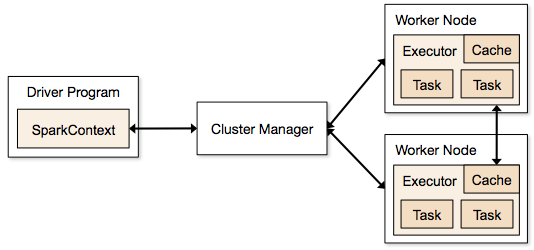
Spark Context: It holds a connection with Spark cluster manager. All Spark applications run as independent set of processes, coordinated by a SparkContext in a program. It is responsible for the configuration of parallelisation among clusters and other cluster properties.

Driver and Worker: A driver is in-charge of the process of running the driver function of an application and creating the SparkContext. A worker, on the other hand, is any node that can run program in the cluster. If a process is launched for an application, then this application acquires executors at worker node.
Cluster
Manager: Just
like all the managers around you, Cluster-manager allocates resources
to each application in the driver program. There are three types of
cluster managers supported by Apache Spark – Standalone, Mesos and
YARN. Apache Spark is agnostic to the underlying cluster manager, so
we can install any cluster manager, each has its own unique
advantages depending upon the goal. They all are different in terms
of scheduling, security and monitoring. Once SparkContext connects to
the cluster manager, it acquires executors on a cluster node, these
executors are worker nodes on cluster which work independently on
each tasks and interact with each other.
Spark vs Traditional big data framework?
In-memory computation: The biggest advantage of Apache Spark comes from the fact that it saves and loads the data in and from the RAM rather than from the disk (Hard Drive). If we talk about memory hierarchy, RAM has much higher processing speed than Hard Drives and due to falling prices of the memory chips, in-memory computation has gained a lot of momentum in data processing activities.
In Hadoop, tasks are distributed among the nodes of a cluster, which in turn save data on disk. When that data is required for processing, each node has to load the data from the disk and save the data into disk after performing operation. This process ends up adding cost in terms of speed and time, because disk operations are far slower than RAM operations. It also requires time to convert the data in a particular format when writing the data from RAM to disk. This conversion is known as Serialization and reverse is Deserialization.
Let’s look at the MapReduce process to understand the advantage of in-memory computation better. Suppose, there are several map-reduce tasks happening one after another. At the start of the computations, both technologies (Hadoop and Spark), read the data from disk for mapping. Hadoop performs the map operation and saves the results back to hard drive. However, in case of Apache Spark, the results are stored in RAM.
In the next step (Reduce operation), Hadoop reads the saved data from the hard drive, whereas Apache Spark reads it from RAM. This creates a difference in a single MapReduce operation. Now imagine, if there were multiple map-reduce operations, how much time difference would you see at the end of task completion.
Language Support: Apache Spark has API support for popular data science languages like Python, R, Scala and Java.
Supports Real time and Batch processing: Apache Spark supports “Batch data” processing where a group of transactions is collected over a period of time. It also supports real time data processing, where data is continuously flowing from the source. For example, weather information coming in from sensors can be processed by Apache Spark directly.
Support for multiple transformations and actions: Another advantage of Apache Spark over Hadoop is that Hadoop supports only MapReduce but Apache Spark support many transformations and actions including MapReduce.
There are further advantages of Apache Spark in comparison to Hadoop. For example, Apache Spark is much faster while doing Map side shuffling and reduce side shuffling. However, shuffling is a complex topic in itself and requires an entire article in itself. Hence, I am not talking about it in more details here.
Installing Spark (with Python-PySpark)
We can install Apache Spark in many different ways. Easiest way to install Apache Spark is to start with installation on a single machine. Again, we will have choices of different Operating Systems. For installing in a single machine, we need to have certain requirements fulfilled. I am sharing steps to install for Ubuntu.
OS: Ubuntu (Version 16.x)
Softwares Required: Java 8+, Python 3.x
Installation Steps:
Step 0: Open the terminal.
Step 1: Install Java
$ sudo add-apt-repository ppa:webupd8team/java
sudo apt update; sudo apt install oracle-java8-installer
If you are asked to accept Java license terms, click on “Yes” and proceed. Once finished, let us check whether Java has installed successfully or not. To check the Java version and installation, you can type:
$ java -version
Step 2 : Once Java is installed, we need to install Scala
$ cd ~/Downloads
$ wget http://www.scala-lang.org/files/archive/scala-2.11.7.deb
$ sudo dpkg -i scala-2.11.7.deb
$ scala –version
Step 3: Install py4j
Py4J is used on the driver for local communication between the Python and Java SparkContext objects; large data transfers are performed through a different mechanism.
$ sudo pip install py4j
Step 4: Install Spark.
By now, we have installed the dependencies which are required to install Apache Spark. Next, we need to download and extract Spark source tar. We can get the latest version Apache Spark using wget:
$ cd ~/Downloads
$ wget http://d3kbcqa49mib13.cloudfront.net/spark-1.6.0.tgz
$ tar xvf spark-1.6.0.tgz
Step 5: Compile the extracted source
sbt is an open source build tool for Scala and Java projects which is similar to Java’s Maven.
$ cd ~/Downloads/spark-1.6.0
$ sbt/sbt assembly
This will take some time to install Spark. After installing, we can check whether Spark is running correctly or not by typing.
$ ./bin/run-example SparkPi 10
this will produce the output:
Pi is roughly 3.14042
To see the above results we need to lower the verbosity level of the log4j logger in log4j.properties.
$ cp conf/log4j.properties.template conf/log4j.properties
$ nano conf/log4j.properties
After opening the file ‘log4j.properties’, we need to replace following line:
log4j.rootCategory=INFO, console
by
log4j.rootCategory=ERROR, console
Step 6: Move the files in the right folders (to make it convenient to access them)
$ sudo mv ~/Downloads/spark-1.6.0 /opt/
$ sudo ln -s /opt/spark-1.6.0 /opt/spark
Add this to your path by editing your bashrc file:
Step 7: Create environment variables. To set the environment variables, open bashrc file in any editor.
$ nano ~/.bashrc
Set the SPARK_HOME and PYTHONPATH by adding following lines at the bottom of this file
export SPARK_HOME=/opt/spark
export PYTHONPATH=$SPARK_HOME/python
Next, source bashrc by typing in:
$ . ~/.bashrc
Step 8: We are all set now. Let us start PySpark by typing command in root directory:
$ ./bin/pyspark –packages
Python vs Scala:
One of the common questions is whether it is necessary to learn Scala to learn Spark? If you are someone who already knows Python to some extent or are just exploring Spark as of now, you can stick to Python to start with. However, if you want to process some serious data across several machines and clusters, it is strongly recommended that you learn Scala. Computation speed in Python is much slower than Scala in Apache Spark.
- Scala is native language for Spark (because Spark itself written in Scala).
- Scala is a compiled language whereas Python is an interpreted language.
- Python has process based executors whereas Scala has thread-based executors.
- Python is not a JVM (java virtual machine) language.
Speed with RDD / Dataframe / Dataset
Spark has three data representations viz RDD, Dataframe, Dataset. For each data representation, Spark has a different API. Dataframe is much faster than RDD because it has metadata (some information about data) associated with it, which allows Spark to optimize query plan. The Dataframe feature in Apache Spark was added in Spark 1.3.
RDD:
After installing and configuring PySpark, we can start programming using Spark in Python. But to use Spark functionality, we must use RDD. RDD (Resilient Distributed Database) is a collection of elements, that can be divided across multiple nodes in a cluster to run parallel processing. It is also fault tolerant collection of elements, which means it can automatically recover from failures. RDD is immutable, we can create RDD once but can’t change it. We can apply any number of operation on it and can create another RDD by applying some transformations. This is basically used in using Spark for dataset manipulation.
We can apply 2 types of operations on RDDs:
Transformation:
Transformation refers to the operation applied on a RDD to create new
RDD.
Action:
Actions refer to an operation which also apply on RDD that perform
computation and send the result back to driver.
Example: Map (Transformation) performs operation on each element of RDD and returns a new RDD. But, in case of Reduce (Action), it reduces / aggregates the output of a map by applying some functions (Reduce by key). There are many transformations and actions are defined in Apache Spark documentation.
How to Create RDD in Apache Spark
Existing storage: When we want to create a RDD though existing storage in driver program (which we would like to be parallelized). For example, converting a list to RDD, which is already created in a driver program.
External sources: When we want to create a RDD though external sources such as a shared file system, HDFS, HBase, or any data source offering a Hadoop Input Format.

 Machines' Guy